For golf clubs
Website, tee sheet and card payments for golf clubs. You pay only when golfers pay online.
Tee Time can build your club a website from your course data, run your tee sheet and take visitors' card payments. There's no subscription and no setup fee. Our only charge is a commission on payments golfers make online, and Stripe's card fees come out of it.
For your golfers
Scout: your course, hole by hole
Scout is Tee Time's hole-by-hole preview of a course. Golfers open it from your course page before they book or before they play.
Golfers can already scout 700+ UK golf courses.
Scout · Shot plan
Hole 17
Par 4 · 367 yds · SI 3
Satellite map and a shot plan you can drag. Switch holes, tilt the map, fly the hole or stand on the tee.
What golfers get
- Each mapped hole on a satellite map, from tee to green, with its par, length and stroke index where we know them.
- A suggested way to play each hole, with the distance of each shot, and an elevation profile from tee to green.
- A 3D view from the tee: the hole as the golfer will see it standing on the tee, with the shots drawn in the air.
- A flyover: the camera flies down the hole along the planned shots, with play, pause and a scrubber.
- It works in a phone's browser or the Tee Time app, with nothing to install.
Find your course in Scout
Type your club or course name to see whether golfers can scout it today.
Or browse every club and open your course's page. Not mapped yet? Anyone can add a course to OpenStreetMap: how to map a golf course.
There's nothing for your club to do. Tee Time builds Scout from OpenStreetMap, the open map anyone can edit, and takes pars and stroke indexes from the course data we hold.
Scout appears where a course is mapped well enough to draw. A course that's at least half mapped shows the holes that are there. Where a course isn't mapped yet, its page asks golfers to help map it, and the preview can appear after a later refresh.
Insights in your club portal counts how often golfers open Scout for your courses.
Your Tee Time club website's course pages show hole drawings from the same map data.
What you pay
- Subscription
- None.
- Setup fee
- None.
- Bookings paid at the club, covered by a membership or paid elsewhere
- No commission.
- Green fees and extras golfers pay online
- A commission on what the golfer pays online through Tee Time. It includes the VAT on our commission, and Stripe's card fees come out of it.
- Refunds
- Our commission on the refunded part is refunded too.
- Booking fee for golfers
- Golfers pay no Tee Time booking fee on your club's own tee sheet, providing your club is signed with Tee Time.
- Leaving
- Either side can end our agreement with 30 days' notice in writing, at any time. Bookings already made go ahead, unless the club can't honour them or we both agree a clean break: then they're cancelled, online payments are refunded and the club repays anyone who paid at the club. You get a copy of your customer and member records, and your courses go back to the booking system they used before, if they had one.
These are the terms of our standard club agreement. Any special terms are agreed in writing in your agreement.
Your website
A club website is included today: every club that signs with Tee Time can have one if it asks.
- We build a starter site straight away from what we already know about your club: home, a page for each course, visitors, dress code, membership, gallery, news, contact and booking.
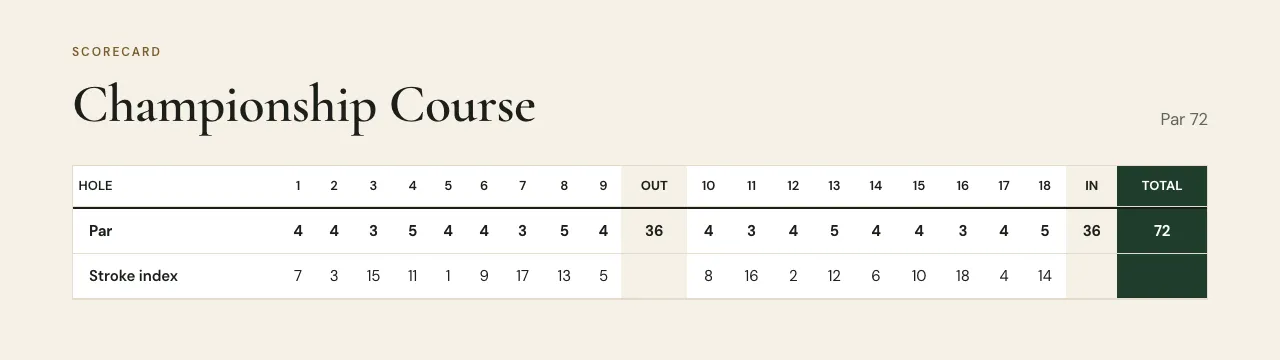
- Course pages show par, stroke index, tee sets and hole drawings from our course catalogue, where we have them, so nobody types in a scorecard.
- Once your course is on the Tee Time tee sheet, the green fees on your website come from its prices, so the two stay in step.
- Six colour schemes and five heading styles; edit in drafts, preview, publish, and go back to an earlier version if you need to.
- It lives at yourclub.tee-time.uk.
Your tee sheet
- Set your hours, prices by day and time, special prices, extras and closures, and how far ahead golfers can book.
- Visitors book in the Tee Time app, in the booking widget on your own website, and on your Tee Time website.
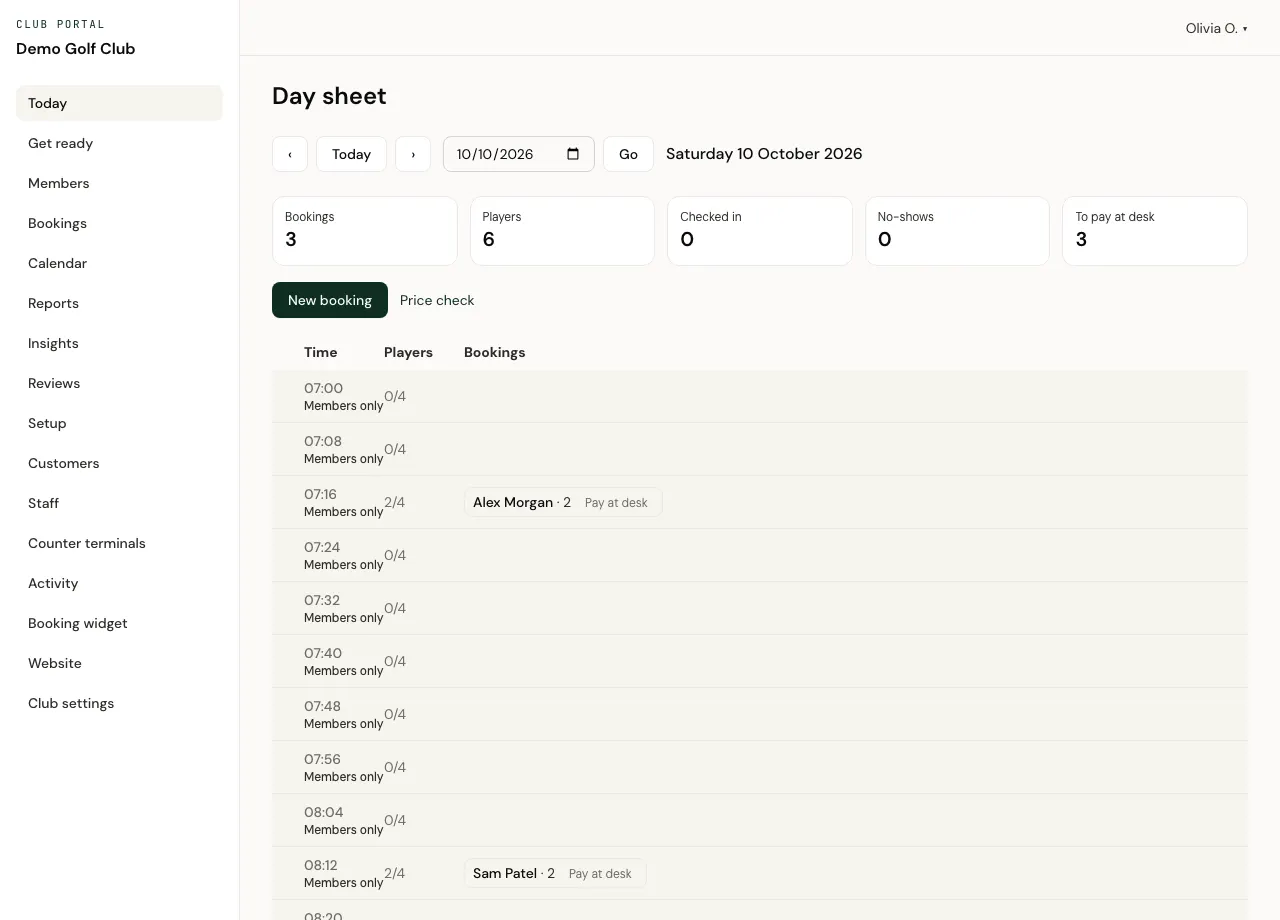
- A day sheet for the desk: check golfers in, mark no-shows, record payment at the desk, move, cancel and refund.
- Staff take bookings for customers, with notes only staff see.
- Counter terminals: a shared computer at the desk that each member of staff unlocks with their own PIN.
Card payments
- For courses you set to take payment online, golfers pay by card when they book.
- Payments go through Stripe. You open your club's own Stripe account from the portal, and Stripe pays your share to your bank on its payout schedule. Tee Time doesn't hold your money.
- Refund in full or in part from the portal.
- Apple Pay works in your booking widget on websites we've registered.
Members and lessons
Set up membership categories, keep tee times for members, give members their own rates, and let a membership cover the green fee. Members link their Tee Time account to your club and book online.
Coaches get their own diaries and lesson types, and golfers book lessons online. Golfers pay at the lesson; online lesson payments aren't available yet.
Your club portal
Everything runs from one back office. Each member of staff signs in with their own account and sees only what their role allows.
- Today: the day sheet
- Bookings
- Calendar
- Setup
- Staff and roles
- Counter terminals
- Activity log
- Customers
- Members
- Reviews and course reports
- Lessons
- Booking widget
- Website
- Card payments
- Insights
- Reports
- Get ready
- Importing bookings when you move over
- Club agreement and documents
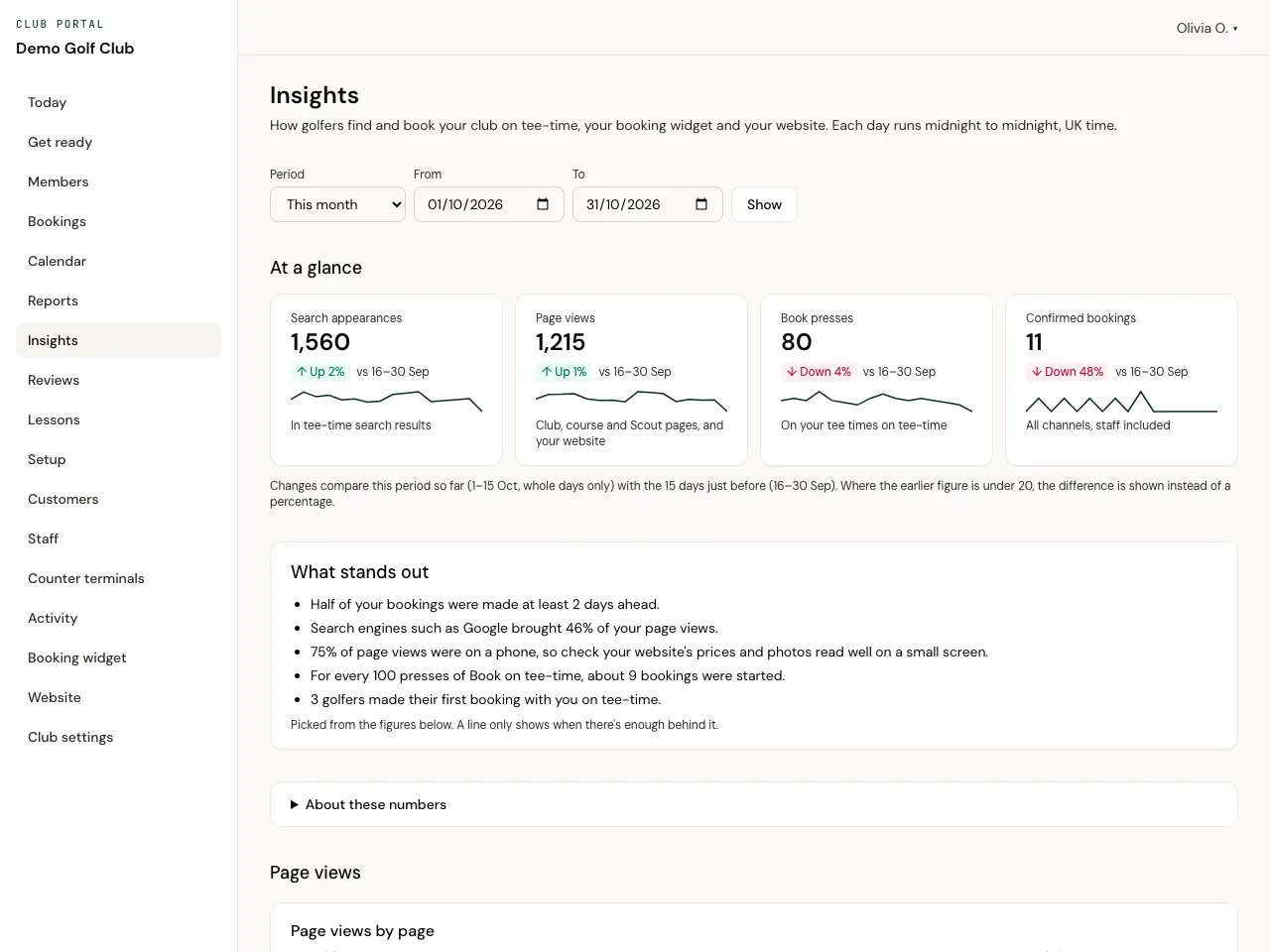
Insights shows how golfers find and book you: how often your courses appear in Tee Time searches, page and Scout views, Book presses and bookings, where visitors came from, and when and how far ahead golfers book. Counted without cookies. Reports gives you bookings and money by payment date or round date, with spreadsheet downloads.
Take the tour of the club portal, or try it yourself on a made-up club.
What golfers tell you
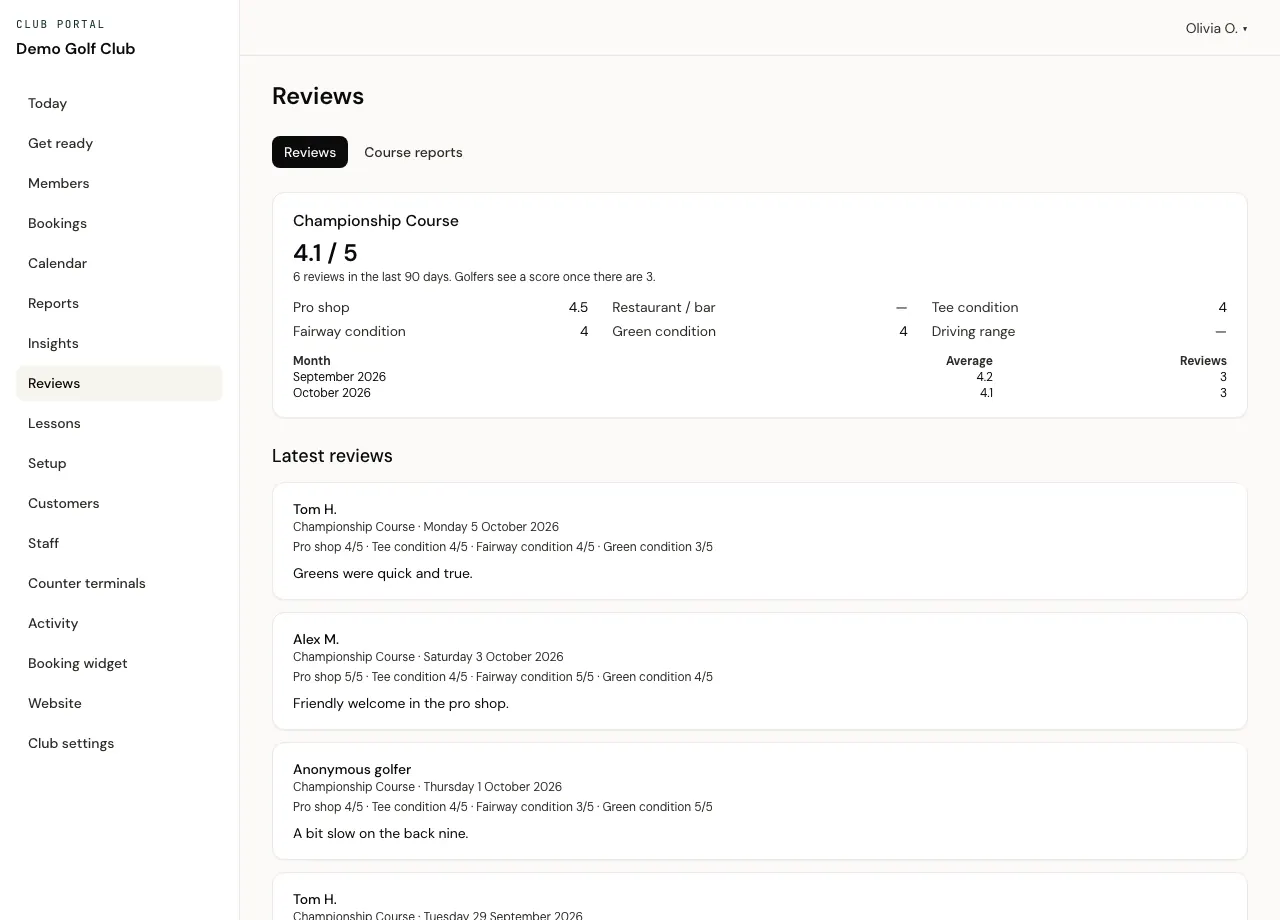
- Golfers who book through Tee Time can review your course after their round: the pro shop, restaurant or bar, tee, fairway and green condition and the driving range, each scored out of 5, and an optional comment.
- The Reviews page in your portal shows each course's scores, a month-by-month average and every comment, newest first.
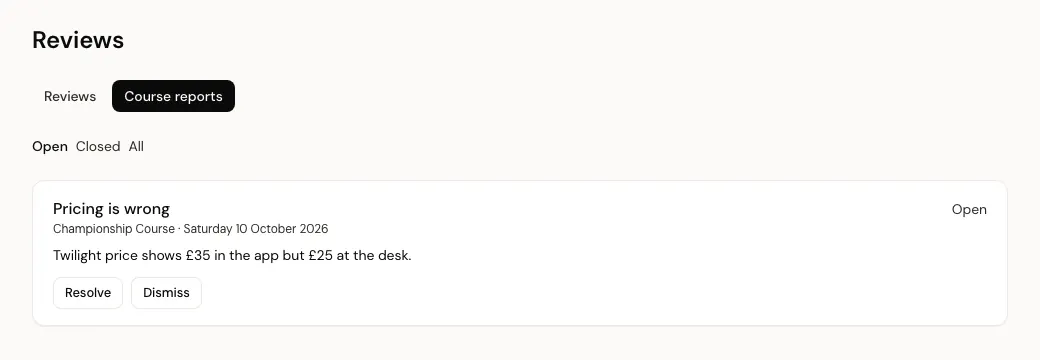
- Golfers can report anything that looks wrong, such as a price or the course details. On courses using your Tee Time tee sheet you resolve or dismiss each report, and the golfer who made it is never named.
- Golfers see a course's score once it has at least 3 reviews from the last 90 days.
Golfers find you
Your courses are listed in the Tee Time app and on tee-time.uk, alongside 1400+ UK golf courses golfers can search and book.
Moving over without double-booking
- We set up your club, and an owner signs the club agreement in the portal.
- Set up your course while golfers keep booking on your current system.
- Import your upcoming bookings from a spreadsheet (CSV) downloaded from your current system.
- Pick a switch-over time, and turn off online booking for that course in your current system from then.
- Go live. Tee Time takes the bookings from that time on.
What Tee Time doesn't do yet
So you can rule us in or out quickly, here is what a club can't do on Tee Time today:
- Competitions, handicaps and results.
- A till for the bar or pro shop.
- Invoicing for societies, functions and company days.
- Collecting membership subscriptions.
- A members' login area on your website, or an app in your club's own name.
- Your own web address: your website lives at yourclub.tee-time.uk for now.
- Card payments on your website's own Book page: golfers booking a course that takes payment online finish on Tee Time.
- Online payment for lessons: golfers pay at the lesson for now.
- A ready-made import for your current system: you download your upcoming bookings as a spreadsheet (CSV) and match its columns once.
- Letting members book further ahead than the course's booking window: they can't yet.
- Bookings for more than 4 players: one booking holds up to 4.
- Phone support: support is by email, during UK business hours.
- Examples from real clubs: the screenshots here show an example club with sample content.
Questions clubs ask
How much does Tee Time cost a club?
There's no subscription and no setup fee. We take a commission only on green fees and extras golfers pay online through Tee Time. Bookings paid at the club, covered by a membership or recorded as paid elsewhere carry no commission.
Do we keep control of our green fees?
Yes. The club sets its own prices, special prices and closures in the club portal.
Who holds the money golfers pay online?
Stripe takes the payment and pays your share to your club's own Stripe account, then on to your bank on Stripe's payout schedule. Tee Time doesn't hold your money.
Do golfers pay a booking fee?
Golfers pay no Tee Time booking fee on your club's own tee sheet, providing your club is signed with Tee Time.
Who owns our customer and member records?
Your club does. For the records you keep in the portal, the club is the controller and Tee Time is its processor under our data processing agreement.
What happens if we leave?
Either side can end the agreement with 30 days' notice. Bookings already made go ahead, unless the club can't honour them or we both agree a clean break: then they're cancelled, golfers' online payments are refunded and the club repays anyone who paid at the club. You get a copy of your customer and member records in a common file format, your courses go back to the booking system they used before, if they had one, and your Stripe account and balance stay yours.
How do we get started?
Email clubs@tee-time.uk. We set up your club, an owner signs the club agreement in the portal, you set up your courses, prices and card payments, and you go live when you're ready.
Guides for clubs
Talk to us about your club
Email us with your club's name and what you'd like to change: your website, your tee sheet, card payments or all three.
We use what you send to answer you, as our privacy policy explains.