For golf clubs
Golf club website, built from your course
A website for your club that starts from what golfers want to know: your courses, your green fees, how to visit and how to book. We build the first version from your course data, and your staff keep it up to date from the club portal.
See how your website could look
This is an example club website, built with the same template your club's site would use. Click around it, switch between its pages, and try each colour scheme and heading style on a desktop or phone screen.
Example club, sample content. Example Golf Club isn't a real club, and its prices, tee times and text are invented. The course in the example is made up too: its drawings are an illustrative layout, not a real course. On your site they're drawn from your course's map data. The photos are illustrations. Booking and links out of the example are switched off.
The example club website loads here.
Pages your site starts with
We build a starter site from what we already know about your club, so you begin with real pages rather than an empty template:
Home. Your club's name, a Book button, your course, visitor information, photos, membership, the latest news and how to find you.
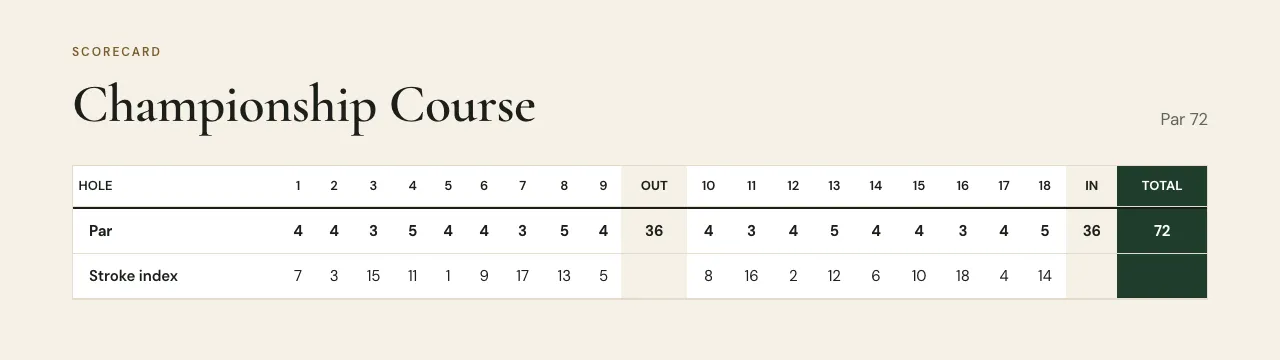
See it in the exampleA page for each course. Holes, par and yardage, a drawing of the course where it's mapped and a scorecard with par, stroke index and yards from each tee, from our course data where we have it.
See it in the exampleHole-by-hole pages. One page per hole with the yardage from each tee, a drawing where the course is mapped, and your own notes and tips.
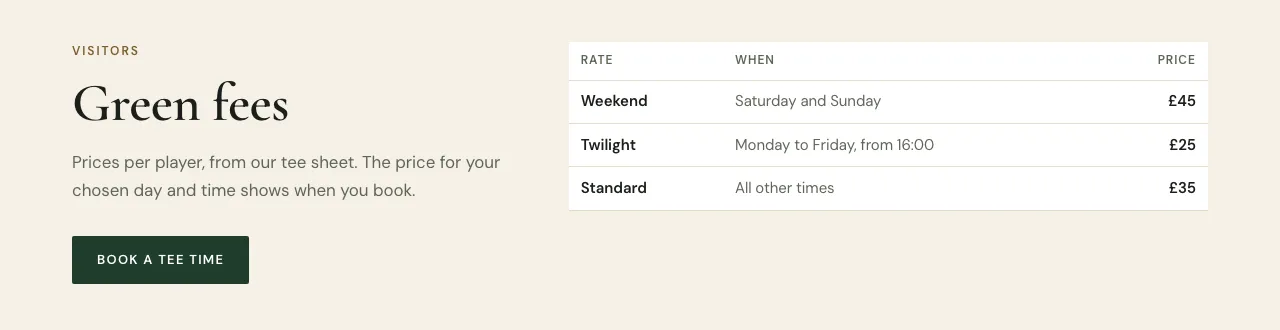
See it in the exampleVisitors. Green fees from your tee sheet once your course is on it (your own words before that), your rules on the course, buggies and trolleys and how to get here, and lessons when your coaches take bookings on Tee Time.
See it in the exampleDress code. A page of its own under Visitors, in parts: on the course, in the clubhouse, footwear, juniors and visitors, not permitted and anything else. It stays hidden until you write one part.
See it in the exampleMembership. What membership offers and a button to enquire.
See it in the exampleGallery. Photos from your club's image library, opening full screen.
See it in the exampleNews. Posts you publish one at a time, with the newest on your home page.
See it in the exampleContact. Your address and contact details, with directions to the course.
See it in the exampleBook. Your tee times, for golfers to book.
See it in the examplePrivacy. Your club's own privacy notice.
See it in the example
Your own rules, such as dress code, buggies and membership, start empty and the editor prompts you to fill them in. An empty visitor topic or dress code page stays hidden until you fill it in, so the site never shows made-up words.
Sections you can add to any page
Every page is built from sections. Add, remove and reorder them in the portal:
Hero. A large heading over a photo or your course drawing, with up to two buttons.
See it in the exampleText and photos. Text, a photo with a caption, or a photo with text beside it.
See it in the examplePhoto strip and gallery. A row of photos, or a full gallery of up to 60.
See it in the exampleButton band. A heading and one button, to any page, to booking or to another website.
See it in the exampleFacts. Up to 12 short pairs, such as membership types and who they're for.
See it in the exampleCourse sections. Course card, course overview, scorecard and hole by hole, all from course data.
See it in the exampleGreen fees. The table from your tee sheet, or your own words before your course is on it.
See it in the exampleVisitor information. Titled topics: dress code, on the course, buggies, opening times, getting here, facilities, societies and anything else.
See it in the exampleMembership. A heading, text, a photo and an enquiry button.
See it in the exampleLessons. How many coaches you have and the lowest lesson price, with a button to book a lesson, when your coaches take bookings on Tee Time.
See it in the exampleLatest news, contact details and getting here. Your newest posts, your contact details, and directions to the course.
See it in the exampleSponsors. Names or logos, each with an optional link.
Course pages from real course data
Each course page shows par, stroke index and tee sets for every hole, where we have them, and hole drawings where the course is mapped. They come from our course catalogue: OpenStreetMap, golf course data providers and clubs' own published scorecards, with credits on the page. Every course with hole data gets its own hole-by-hole pages.
If something's wrong or missing, tell us and we'll correct it. Nobody at the club types in a scorecard.
Green fees that follow your tee sheet
Once your course is on the Tee Time tee sheet, the green fee table on your website is worked out from the prices you set there, including which days and times each rate applies. Change a price in the portal and the website follows. Before that, you write your green fees in yourself.
Your club's look
Choose one of six colour schemes and one of five heading styles, then change the main colour to your own if you like: it's checked so white text on it stays readable.
- Colour schemes: Heathland, Royal navy, Links, Claret, Parkland, Charcoal.
- Heading styles: Heritage (Cormorant Garamond), Clubhouse (Libre Caslon), Editorial (Playfair Display), Links (EB Garamond), Modern (DM Sans), Crest (Cinzel), Geometric (Jost).
- Your crest or logo next to your club's name, and a short status line in the header, such as the course conditions.
- Links to your Facebook, Instagram, X and YouTube pages, and a Members link to a members' area you already have elsewhere.
- Photos from your club's image library.
Pages are laid out for phones first, because that's where many golfers look you up. Try the colours and headings in the example.
Editing, publishing and news
- Staff with website permission edit pages in the club portal, with a preview of the saved draft beside the page.
- Changes stay in a draft until you publish. Every publish is kept as a version, and you can restore an earlier one into your draft.
- Add pages from templates (blank, visitor information, membership, dress code, societies and groups) and put a page under another in the menu, one level deep.
- Upload photos to your image library. They're resized on your device before they upload, and you write the alt text that describes them.
- Publish news posts one at a time.
Your address and going live
- Your website gets an address such as yourclub.tee-time.uk when we switch it on for your club.
- When you've published, staff with website permission press Go live. Your club needs to have accepted our data processing agreement first.
- Going live makes it your main website when its address is active: search engines can list it and your course pages on Tee Time link to it. Turn off "This is our main website" to keep your old address on Tee Time and take the site out of search engines.
Booking from your website
Once your course is on the Tee Time tee sheet, golfers book your tee times on the website's Book page. For courses where golfers pay at the club, the booking is made right there. For courses that take payment online, golfers finish booking and pay on Tee Time.
Keeping your current website? Add the Tee Time booking widget to it instead: golfers book and pay by card inside your own site. See the booking system.
What it costs
A club website is included today: every club that signs with Tee Time can have one if it asks. Your club pays Tee Time the same way for everything:
- Subscription
- None.
- Setup fee
- None.
- Bookings paid at the club, covered by a membership or paid elsewhere
- No commission.
- Green fees and extras golfers pay online
- A commission on what the golfer pays online through Tee Time. It includes the VAT on our commission, and Stripe's card fees come out of it.
- Refunds
- Our commission on the refunded part is refunded too.
- Booking fee for golfers
- Golfers pay no Tee Time booking fee on your club's own tee sheet, providing your club is signed with Tee Time.
- Leaving
- Either side can end our agreement with 30 days' notice in writing, at any time. Bookings already made go ahead, unless the club can't honour them or we both agree a clean break: then they're cancelled, online payments are refunded and the club repays anyone who paid at the club. You get a copy of your customer and member records, and your courses go back to the booking system they used before, if they had one.
These are the terms of our standard club agreement. Any special terms are agreed in writing in your agreement.
What the website doesn't do yet
- Use your own web address: it lives at yourclub.tee-time.uk for now.
- A members' login area.
- Take card payments on its own Book page: golfers booking a course that takes payment online finish on Tee Time.
- Run your own code or embeds from other sites. Pages are built from Tee Time's sections, which keeps them fast and safe.
Questions clubs ask
Do we have to type in our scorecard and course details?
No. Par, stroke index, tee sets and hole drawings come from our course catalogue where we have them. If something's wrong or missing, tell us and we'll correct it.
Can we keep our current website instead?
Yes. Add the Tee Time booking widget to your current website and visitors book and pay there, without a Tee Time website.
Can our staff edit it?
Yes. Staff with website permission edit pages in the club portal, see a preview, publish when they're ready and can go back to an earlier version.
Will it show up on Google?
Yes, once it goes live: with its address active it becomes your main website and search engines can list it. Turn off "This is our main website" in the portal if you want to keep your current site as the one Google and Tee Time show.
Is the website extra?
A club website is included today: every club that signs with Tee Time can have one if it asks.
Talk to us about your club
Email us with your club's name and what you'd like to change: your website, your tee sheet, card payments or all three.
We use what you send to answer you, as our privacy policy explains.